Native Badland Clients
Chrome extension, macOS menubar app, and a mobile web terminal — all authenticated against the same Badland API.
Chrome extension
Inline LLM actions in the browser — select text, right-click, and run a Badland model on the selection or the full page context. Authenticates against the Badland API, supports streaming responses, and uses the same provider toggles as the web client.
macOS menubar app
Native macOS menubar app with global hotkeys for fast LLM access without switching windows. Same backend as the web client, same token, same context history. Built so a model call is one keystroke away whatever app I’m in.
Mobile web terminal
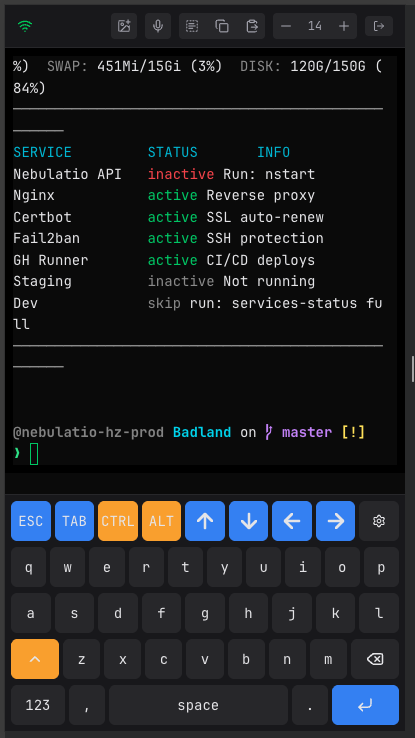
A web-based terminal optimized for phones, with a full developer keyboard — Ctrl, Alt, Esc, Tab, and arrow keys all present as on-screen keys. Built specifically to solve the “I need to paste a screenshot into an EC2-hosted Claude Code session from my phone” problem, which normally requires careful SCP-ing back and forth. The mobile terminal speaks directly to the EC2 box over Tailscale and accepts image paste straight into the running session.
Why three clients
The chat website is the canonical surface, but I’m not always sitting at a desktop browser. The extension covers in-browser flows, the menubar covers “model call from anywhere on macOS,” and the mobile terminal covers the “hands-on-keyboard EC2 work, but I’m on a phone” case. All three speak the same API, share the same auth, and pull from the same conversation history, so the surface I’m using never matters to the state.